
UTM Source vs. Medium: A Clear Tagging Guide
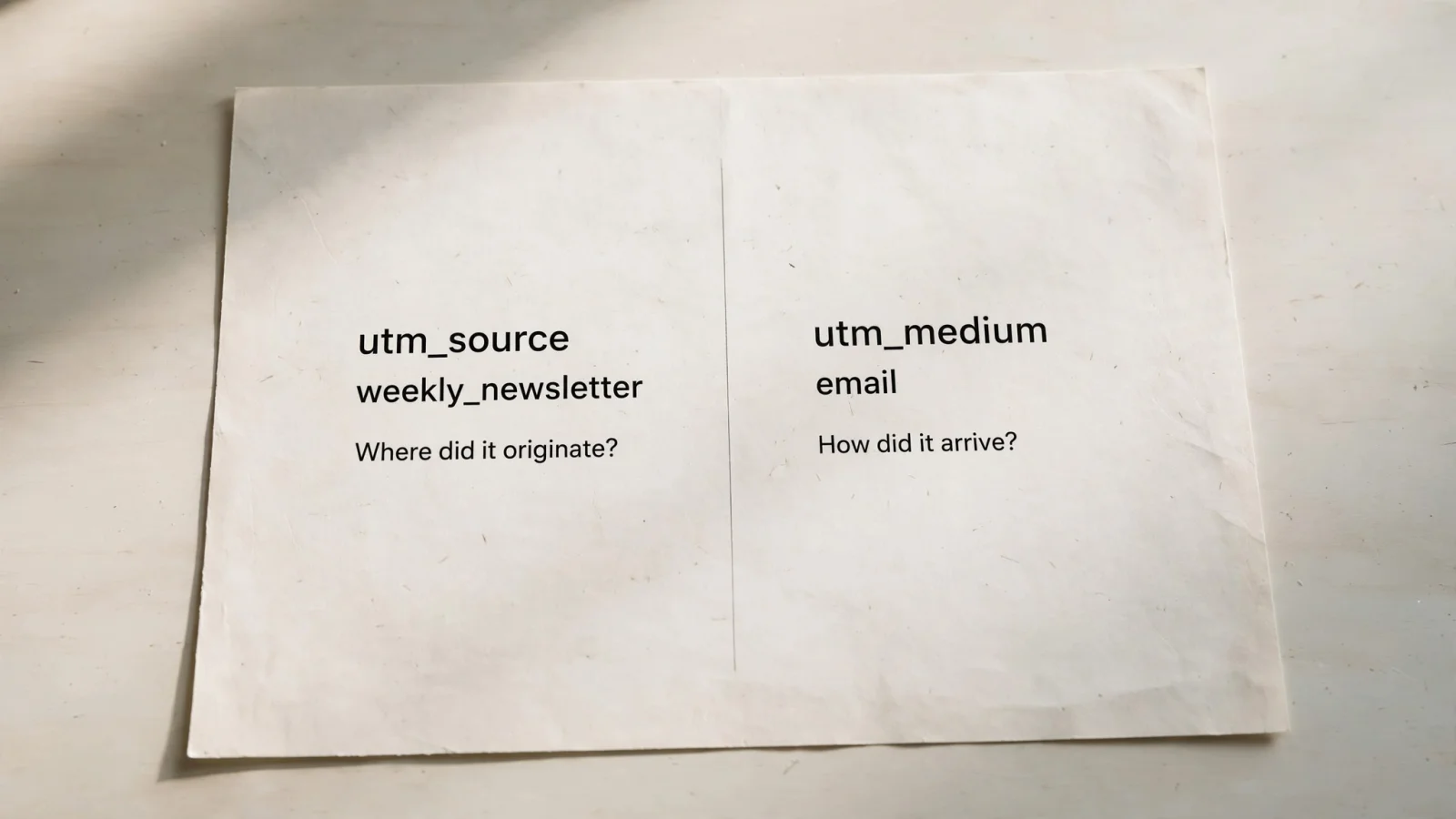
Trnqify bridges AI-assisted campaign creation and privacy-conscious link measurement by turning a plain-language prompt into a consistently tagged short link, then tracking clicks without cookies. For a link in a weekly newsletter, use utm_source=weekly_newsletter and utm_medium=email. This baseline separates the origin of the traffic from the delivery method. The source tells you where a click originated, while the medium categorizes the channel that brought it. Missing this distinction creates messy reports where specific partner names sit in the same column as broad categories like “social,” making it impossible to evaluate your marketing channels accurately.
A well-structured campaign link needs both parameters to classify traffic properly on the destination site. Building these links by hand often introduces typos and inconsistent naming, so Trnqify acts as a practical bridge. The platform allows you to turn a plain-language campaign brief into a consistently tagged short link and measure clicks before the user reaches your website.
UTM Source vs. Medium: How to Map the Visitor Journey
Comparing UTM source vs medium comes down to answering two distinct questions about a visitor’s journey. You need to know the specific location they came from and the broader channel category that delivered them. Placing the two parameters side by side shows how they work together to categorize traffic.
| Comparison Criterion | UTM Source | UTM Medium |
|---|---|---|
| Answers the question | Where did the click originate? | How did the traffic arrive? |
| Category type | Specific entity (site, app, publisher, partner) | Broad channel or method (email, social, cpc) |
| Typical values | weekly_newsletter, instagram, partner_acme | email, paid_social, referral |
| Reporting granularity | Narrow, comparing specific placements or senders | Broad, comparing overall marketing channels |
| Primary function | Identifying the exact property hosting the link | Grouping similar traffic for high-level reporting |
UTM Source: Name the Origin
The source parameter identifies the exact entity that sent the traffic. An origin can be a website, an application, a social platform, a specific newsletter, a podcast show, or a partner company. People often default to naming the software that sent a message, but the ideal source value depends entirely on what you want to compare in your reports.
If you use utm_source=mailchimp, your analytics platform groups all traffic from that sending software together. That choice works if your goal involves comparing Mailchimp against a different sending platform. To compare the performance of a weekly update against a dedicated promotional blast, use utm_source=weekly_newsletter and utm_source=promo_blast instead. Google Analytics defines Source as the specific platform, website, app, or online location that referred a user, and lists spring_newsletter as an email-campaign example, so source values can identify an email campaign.
UTM Medium: Name the Channel or Method
The medium parameter classifies the type of traffic. This broad categorization groups distinct sources into overarching channels like email, paid social, organic social, referral, and audio. Standard medium values allow your analytics platform to calculate total email revenue or total paid social conversion rates, regardless of how many individual newsletters or ad networks you use.
Values like email, banner, and cpc act as standard methods for bringing traffic to a site. If your source is a specific conference booth, your medium might be qr, whereas a partner website source pairs with a referral medium. While utm_campaign groups links belonging to a specific initiative like fall_launch_2026, the medium parameter ensures that every channel participating in that launch gets categorized correctly in your traffic acquisition reports.
Applying Source and Medium to Five Campaign Types
Seeing these definitions applied across different marketing activities clarifies how source and medium pair up in practice. The following table outlines recommended naming choices for common campaign placements.
| Campaign Placement | utm_source | utm_medium | Optional Note |
|---|---|---|---|
| Brand newsletter | weekly_newsletter | email | Use the newsletter name rather than the sending platform to compare specific email series. |
| Paid Instagram campaign | instagram | paid_social | Use a consistent social medium for organic posts to keep paid and organic traffic separated. |
| Podcast sponsorship | the_growth_show | audio | A link placed in the show notes may be better represented as a referral medium with utm_content=show_notes. |
| Partner website link | partner_acme | referral | Use affiliate if the link belongs to a formal program, and email for a partner’s newsletter. |
| Conference poster | conference_booth | qr | Use utm_content=poster or utm_content=badge to distinguish physical placements. |
These pairs demonstrate the flexibility of the source parameter and the rigidity needed for the medium parameter.
When configuring a brand newsletter, selecting weekly_newsletter as the source isolates that specific audience in your reports. The medium remains email, aggregating with transactional messages or automated onboarding sequences that share the same delivery method.
For a paid Instagram campaign, the source is instagram and the medium is paid_social. Failing to separate paid_social from a generic social medium used for organic posts causes analytics platforms to blend paid ad traffic with standard profile clicks. This blended data makes calculating return on ad spend extremely difficult.
Podcast sponsorships introduce a choice between audio and text placements. An audio ad read during the episode uses the_growth_show as the source and audio as the medium. If the host also places a link in their text show notes, that click originates from a webpage or app reading environment. Under those conditions, the_growth_show remains the source, but the medium becomes referral, and you add utm_content=show_notes to record the exact placement.
Partner links benefit from precision because partnerships take multiple forms. A standard link on a partner’s website uses their name as the source and referral as the medium. If that partner sends an email on your behalf, the source remains their name, but the medium changes to email. When the partner uses a specialized affiliate tracking program, the medium shifts again to affiliate.

QR codes on physical collateral need custom medium values. A conference poster scanned by an attendee uses conference_booth as the source and qr as the medium. You can then use the utm_content parameter to specify whether the scan came from a large lobby poster or a small staff badge.
Enforcing Consistent UTM Values
A tagging strategy only works when everyone on the team applies the same vocabulary. A central spreadsheet or an AI URL shortener setup helps enforce this consistency across campaigns.
Start by deciding how to name sources and channels before generating links, choosing source granularity based on the comparisons the team needs to make. Select one canonical medium per channel and document it so no one rotates among values like paid_social, social_paid, and cpc for the exact same reporting category. Reserve the utm_campaign parameter entirely for the initiative name and utm_content for creative or placement differences.
UTM parameter values are case-sensitive. Google Analytics URL builders explain that Instagram and instagram split your reports into two different rows. While GA4’s default channel definitions do not rely on case sensitivity to group traffic, the underlying source and medium reports show distinct entries if capitalization varies. Sticking to lowercase values keeps the data clean and predictable.
You can automate a UTM naming convention by using an AI assistant to prepare the links, provided you supply the assistant with a strict taxonomy rather than a vague campaign description.
A prompt to build a link looks like this:
Create a short link for this destination for the Fall Launch campaign. Placement: weekly newsletter. Use
utm_source=weekly_newsletter,utm_medium=email,utm_campaign=fall_launch_2026, andutm_content=hero_cta. Keep every value lowercase and do not invent a different source or medium.
The resulting destination URL looks like this:
https://example.com/offer?utm_source=weekly_newsletter&utm_medium=email&utm_campaign=fall_launch_2026&utm_content=hero_ctaAlways check the resulting URL before sharing it. Trnqify applies these agreed tags to a short link and reports on the redirect-click activity, though the system relies on you to supply the taxonomy. Developers and agent builders can use the Model Context Protocol (MCP) to connect a marketing agent directly to Trnqify, returning the source, medium, campaign, and short URL directly to the workflow based on that fixed vocabulary. For MCP and agent-to-agent (A2A) workflows, the same approach keeps automated link creation aligned with the team’s approved naming rules, so proposed UTM values can be checked before a campaign link is shared. If you plan to use Trnqify’s API or analytics in that workflow, check the current plan details because the available capabilities depend on the plan.
How GA4 and Short Links Handle Reporting
The values placed in a tagged URL feed directly into the channel categories and click counts that analytics products derive. These are related layers, yet they operate separately and measure different moments in the user journey.
GA4 Default Channels and Custom Values
Google Analytics 4 uses predefined rules to sort incoming traffic into default channel groups by mapping specific UTM values to overarching categories. These mappings are GA4-specific rules rather than universal internet standards.
GA4 recognizes audio, email, affiliate, and referral under specific conditions. Paid social classification relies on a recognized social source combined with a matching paid-medium pattern. Using a custom medium like qr, or substituting podcast instead of audio, means GA4 channel rules might drop that traffic into the Unassigned category unless another condition catches it.
When a distinct QR or podcast category matters for your reporting, you have to define a custom channel group inside the analytics platform. The tags on the URL provide the raw data, and the analytics platform decides how to categorize it based on the rules configured in the property.
Auto-Tagging for Paid Media
Connected ad platforms like Google Ads use auto-tagging to append a click ID to the destination URL instead of manual UTM parameters. Google recommends this approach for connected platforms to ensure full data integration.
Appending manual UTMs to a URL that also receives an auto-tagged click ID generally prompts GA4 to use the auto-tagged values for source, medium, and other traffic-classification dimensions. Google documents specific exceptions when click IDs fail to operate as intended, allowing the manual UTMs to supply the cross-channel values. So, when a GCLID cannot be used as intended and any UTM parameter is present, Google Analytics derives cross-channel traffic-source values from UTMs rather than Google Ads auto-tagging.

Redirect Clicks Versus Sessions and Conversions
UTM parameters label the destination URL so the destination analytics platform can classify the arriving traffic, but those tags do not count clicks.
Trnqify reports clicks at the short-link redirect layer. When a user clicks a Trnqify short link, the platform logs the action and forwards the user to the long destination URL containing the UTM parameters. These two measurement systems track different events at distinct collection points.
A redirect click indicates that a browser requested the short link, whereas a session in Google Analytics indicates that the user’s browser successfully loaded the destination page, executed the JavaScript tracking code, and registered the visit. A user might click a short link but close their browser before the destination page finishes loading. In that scenario, Trnqify records one click, and the destination site records zero sessions.
This difference matters for click analytics without cookies. Trnqify measures short-link clicks without placing cookies or tracking scripts on the shared link itself, keeping the redirect measurement private. Once the user lands on the destination URL, the destination site’s analytics platform takes over and applies whatever tracking scripts that specific property configured.
The Verdict: Source Is Where, Medium Is How
Choosing between source and medium relies on a brief decision test. Ask where the traffic originated to choose the source, and ask how the link was delivered to choose the medium.
A proper campaign link needs both parameters to function correctly, combining an origin like weekly_newsletter with a delivery method like email. Select a source granularity based on the exact comparisons required for your reports. To compare individual newsletters, use their specific names as sources; if you only care about the sending software, use the platform name.
Keep medium values strictly consistent across every link generated. A single typo in a medium parameter creates a new, fragmented row in your channel reports. Using the campaign and content fields for initiative names and creative details keeps the source and medium free of extra information.
Finally, review short-link clicks separately from destination analytics, as they measure different parts of the journey. For teams looking to build these links accurately every time, Trnqify provides the infrastructure to create AI-assisted UTM short links, log redirect clicks without cookies, and organize campaign data while keeping link measurement privacy-conscious.
Ready to stop wrestling with spreadsheets and broken tracking links? Create your free Trnqify account to generate consistently tagged short URLs, track campaign clicks at redirect, and keep your link management organized.
Frequently Asked Questions
What is the difference between UTM source and medium?
UTM source identifies where traffic originated — a specific site, app, newsletter, or partner. UTM medium categorizes the channel that delivered them — email, paid_social, social, referral, or audio. Source answers 'where,' medium answers 'how.'
How do I choose a UTM source value?
Pick the granularity you need to compare in reports. If comparing newsletters, use `weekly_newsletter` or `promo_blast`. If comparing sending platforms, use `mailchimp` or `constant_contact`. Source should name the specific entity hosting the link.
What are standard UTM medium values?
`email`, `paid_social`, `social` (organic), `referral`, `audio`, and `qr` are standard. GA4 maps these to channel groups; using a custom medium like `qr` or substituting `podcast` instead of `audio` may drop traffic into Unassigned unless you define a custom channel group. See https://trnq.io/bEyttHe for Google's documentation.
How do QR codes work with UTMs?
QR codes on physical collateral need custom medium values. A conference poster scanned by an attendee uses `conference_booth` as the source and `qr` as the medium. You can then use the `utm_content` parameter to specify whether the scan came from a large lobby poster or a small staff badge.
What happens if I forget a UTM parameter?
Google Analytics will still record the visit, but it may place it in Unassigned or misclassify the channel. A missing medium means GA4 cannot apply its default channel rules; a missing source makes it impossible to compare specific placements. Trnqify reports the click regardless, but destination analytics need both parameters to classify traffic correctly.
Why does Trnqify use short links for UTM campaigns?
Trnqify records a click at the redirect layer and forwards the user to the long destination URL containing UTM parameters. The two measurement systems track different events at distinct collection points — a redirect click counts when the short link is requested, while a session in Google Analytics only counts when the destination page loads and executes tracking code. Create a free account at https://trnq.io/mFqm3wC — no credit card required.