
How We Run Our Blog With Trnqify: AI Writes, MCP Links
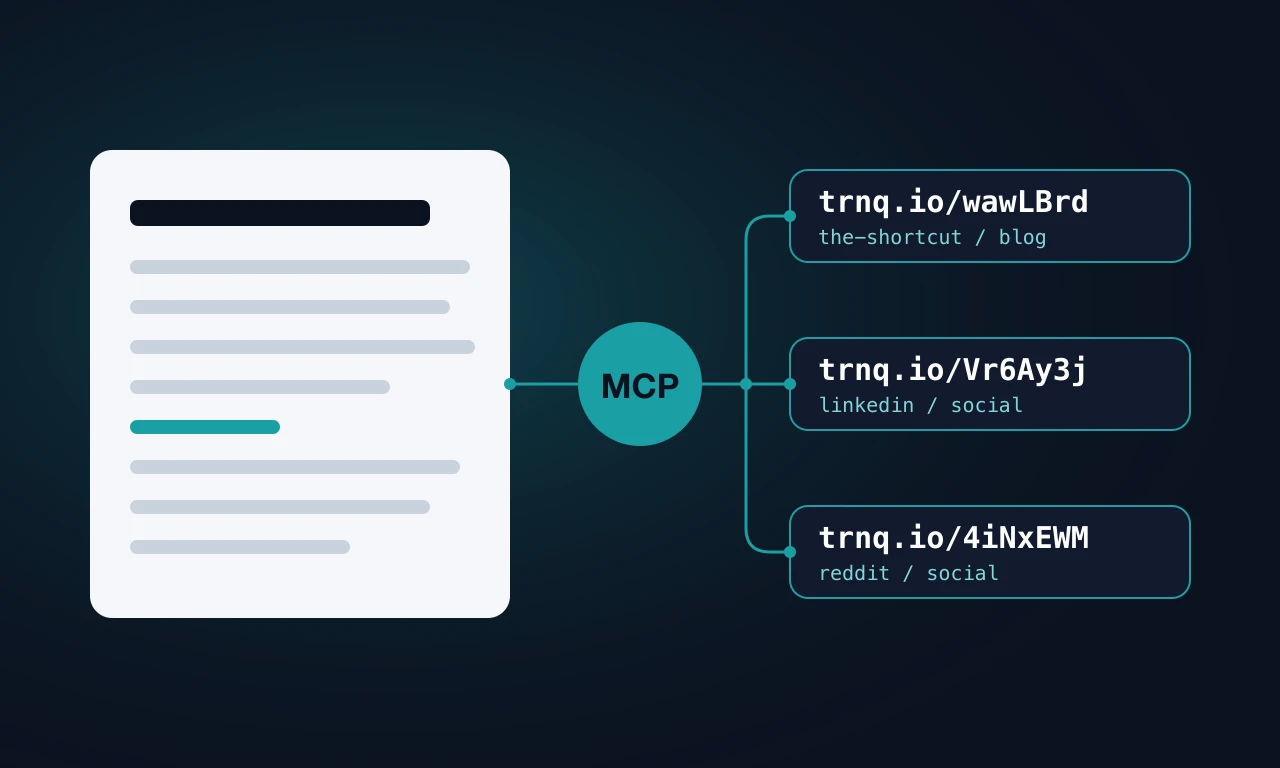
Every post on The Shortcut is written by an AI agent. The same agent creates every tracked short link inside the post, by calling Trnqify’s own MCP server, and creates one more link per social platform when the post goes live. This post was produced exactly that way, so everything below is its own worked example.
Trnqify is a privacy-first URL shortener with click analytics, a REST API, and an MCP server that lets AI assistants create and tag links for you. If you want to copy this setup, the MCP setup steps are in the Trnqify docs. It needs a Standard or Pro plan.
Want this setup for your own posts?
Connecting an AI assistant over MCP takes a Standard or Pro plan. Create your Trnqify account to get started.
Try Standard free for 14 days. No card. Sign up, or log in to your Free account, and the trial starts automatically. After that it’s $9/month if you add a card, or you go back to the Free plan.
The Workflow at a Glance
- Draft. An AI agent writes the post from a short brief. A person reviews it, edits it, and works with the agent on revisions.
- Links inside the post. While drafting, the agent shortens every outbound and product link with the Trnqify MCP
createLinktool, taggedsource=the-shortcut,medium=blog,campaign=<post-slug>. - Links for social. Once the post’s URL is final, the agent creates one short link per platform, tagged
source=<platform>,medium=social,campaign=<post-slug>.
Then we read the results in Trnqify analytics, link by link and across the account.
Step 1: The AI Drafts the Post
The agent is an AI coding assistant working in the repository that holds this site. Its brief is a Linear issue. The one for this post began:
Write and publish a post on The Shortcut showing how Trnqify uses its own product to run its blog: an AI assistant writes the posts, uses the Trnqify MCP server to create the short links inside each post, and after publishing uses the MCP server again to create a tagged short link for each social platform.
From there the agent reads two or three existing posts for tone, checks product claims against the pricing and features pages in the same repository, and writes a Markdown file with the title, description, date, category, tags, and FAQs. It works on a branch, and nothing is published until a person has reviewed it and merged it.
To be plain about it: posts on this blog are AI-written and human-edited. A person reads every draft, edits it directly, and sends feedback back to the agent for another pass. It’s a collaboration, not a rubber stamp. On this post, that meant redrawing the diagram at the top twice and reworking how the review itself is described.
Step 2: Short Links Inside the Post
The instruction for links is not typed into each chat. It lives in a project rule that the agent loads whenever it edits a blog post. This is the rule, word for word:
When updating a post for SEO, shorten outbound and product CTA URLs via
Trnqify MCP (user-trnqify createLink) with source=the-shortcut,
medium=blog, campaign=<slug>. Write https://trnq.io/<path>.
Keep other Shortcut article links direct.
A longer version of the rule tells the agent to call listLinks first and reuse a link when the destination and all three tags already match, so a post doesn’t collect duplicates. Links to other Shortcut articles stay as direct links, which keeps internal links clean for search engines.
Here is the real call the agent made for the pricing link in this post, and what the MCP server returned:
{
  "link": {
    "longUrl": "https://trnqify.com/pricing/",
    "name": "Shortcut ai-written-blog-trnqify-mcp-links: pricing",
    "source": "the-shortcut",
    "medium": "blog",
    "campaign": "ai-written-blog-trnqify-mcp-links"
  }
}
{
"link": {
"path": "L4kaYRE",
"longUrl": "https://trnqify.com/pricing/",
"source": "the-shortcut",
"medium": "blog",
"campaign": "ai-written-blog-trnqify-mcp-links",
"createdVia": "api",
"totalClicks": 0
}
}We left out the account identifiers in the response. The agent then wrote https://trnq.io/L4kaYRE into the post wherever it links to pricing.
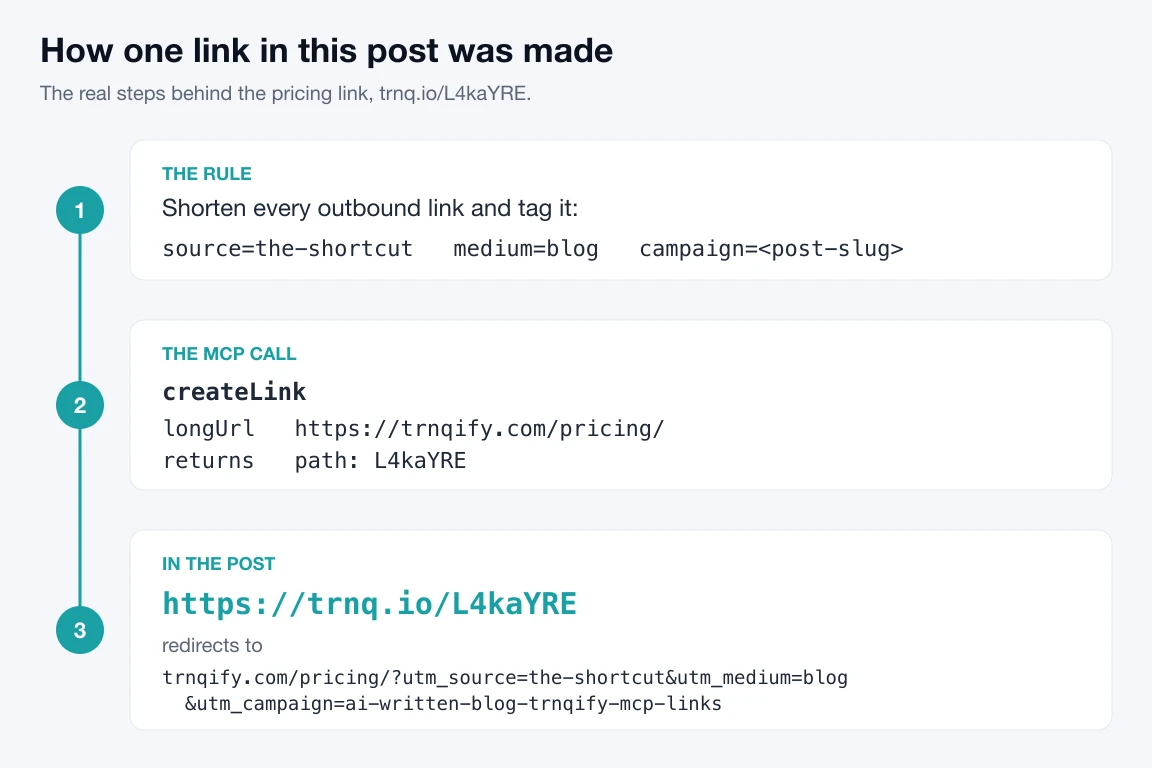
Why these three tags? source=the-shortcut says the click came from the blog, medium=blog groups it with other owned content, and campaign=<post-slug> says which post. Trnqify appends them as utm_source, utm_medium, and utm_campaign when it redirects, so the destination’s own analytics see the same values. This post has four in-post short links:
| Destination | Short link |
|---|---|
| Trnqify docs (MCP setup) | trnq.io/wawLBrd |
| Pricing | trnq.io/L4kaYRE |
| Features: MCP and A2A | trnq.io/tpt3ePW |
| modelcontextprotocol.io | trnq.io/rzqNBqV |
All four use the same tags, the-shortcut / blog / ai-written-blog-trnqify-mcp-links, and all four use Trnqify’s generated seven-character paths. Pro accounts can ask for a readable custom slug through the same tool, but most readers on Standard would get generated paths, so that’s what we used here.
Step 3: One Link per Social Platform After Publishing
Social links point at the post itself, so they can only be created once the post’s URL is final. The instruction in the brief:
After the post is live, create one tagged short link per social platform with the MCP server, pointing at the published URL.
We share posts on LinkedIn and Reddit, so that means two links. The LinkedIn call:
{
  "link": {
    "longUrl": "https://trnqify.com/the-shortcut/ai-written-blog-trnqify-mcp-links/",
    "name": "Social linkedin: ai-written-blog-trnqify-mcp-links",
    "source": "linkedin",
    "medium": "social",
    "campaign": "ai-written-blog-trnqify-mcp-links",
    "previewTitle": "How We Run Our Blog With Trnqify: AI Writes, MCP Links",
    "previewImageUrl": "https://trnqify.com/images/the-shortcut/ai-written-blog-trnqify-mcp-links/hero.webp"
  }
}
We trimmed the preview description from the call above. The preview fields set the title, description, and image a platform shows when the short link is pasted into a post. These are the links for this very post:
| Platform | Short link | utm_source | utm_medium | utm_campaign |
|---|---|---|---|---|
trnq.io/Vr6Ay3j | linkedin | social | ai-written-blog-trnqify-mcp-links | |
trnq.io/4iNxEWM | reddit | social | ai-written-blog-trnqify-mcp-links |
If a post’s URL ever changes after these links exist, the agent edits them with updateLink instead of creating new ones, so links already shared keep counting toward the same totals.
Where we actually use short links: in LinkedIn posts, and on Reddit only in communities whose rules allow them. Some subreddits remove posts and comments that contain shortened links, so check the rules first and post the full URL where short links are not welcome.
What We See in Analytics
Here are our real social links with their all-time click totals. The two new links for this post are highlighted, and every amber tag breaks the convention above.
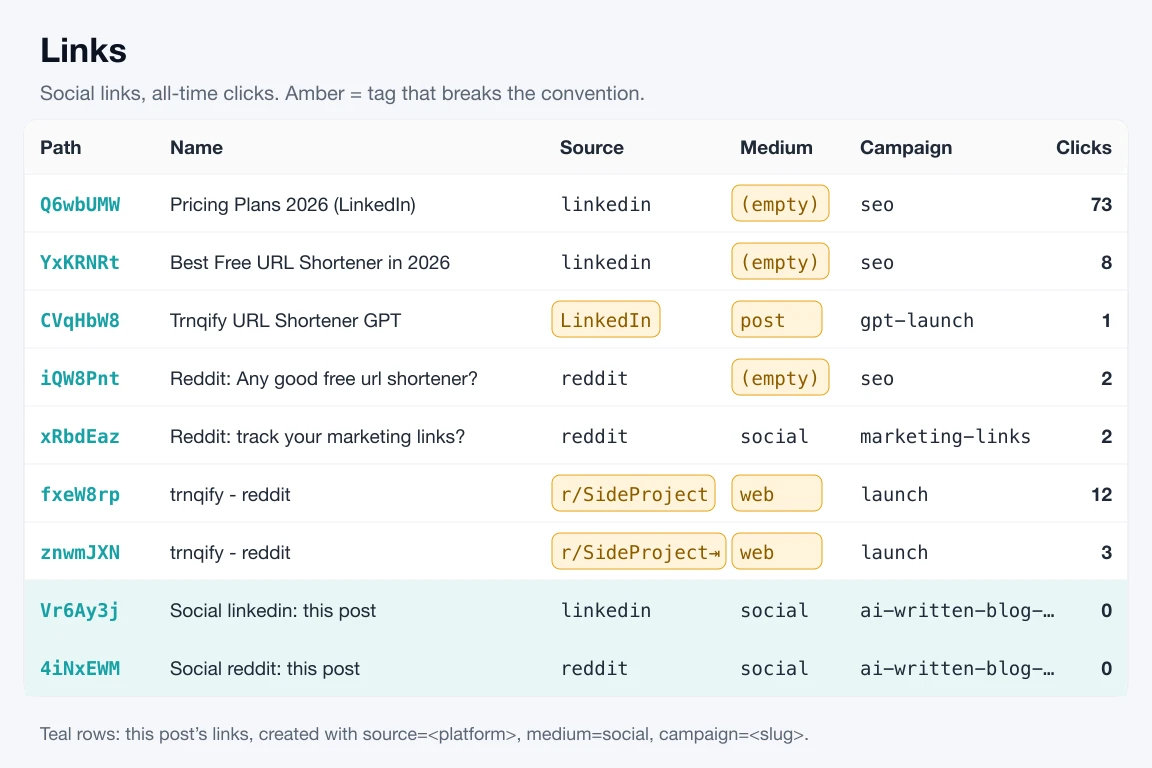
Grouping the same links by source shows the bigger picture. Before this post, links inside our blog posts, all tagged the same way across 197 links and 27 posts, had 4,387 clicks. LinkedIn links had 82, but one of those clicks is filed under LinkedIn instead of linkedin, and Reddit is split across three spellings.
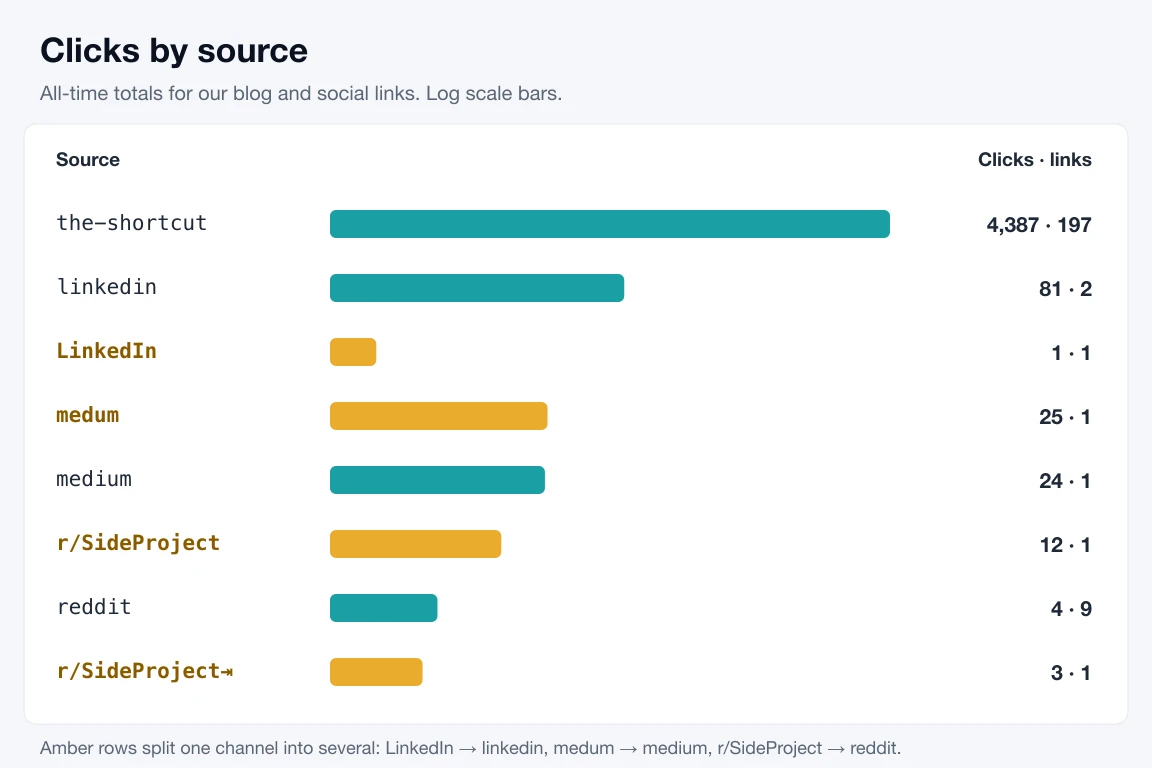
The amber rows are hand-typed values from before the convention: a capitalized LinkedIn, a medium with no value, a typo (medum), and a source with an invisible trailing tab. The links tagged by the agent from a written rule don’t have that problem.
In the app, each link has its own analytics page with a click trend, and the Analytics page beside Links adds clicks up across the whole account. On Pro, that page also rolls clicks up by campaign, source, and medium, which is where consistent tags pay off.
What It Does Not Do
- It is not on the free plan. MCP, A2A, and the REST API are on Standard ($9/month) and Pro ($29/month). Standard includes 10,000 API requests a day, and MCP calls count toward the same limit. Free-plan keys are rejected. See pricing.
- It does not normalize UTM values. Trnqify reports tags exactly as written. If one link says
LinkedInand another sayslinkedin, you get two sources. The convention has to live in your prompt or project rule. - It does not always remember to reuse links. The rule says to check
listLinksfirst. Our 1.5 release post still ended up with two pricing links that have identical tags, because the post was revised in two passes. A quicklistLinksreview before publishing catches it. - It does not write or schedule your social posts. The MCP server creates and updates links. Captions and posting are still done by a person.
- It does not read detailed analytics. The MCP tools are
createLink,getLink,listLinks, andupdateLink.listLinksincludes each link’s total clicks, but trends and breakdowns are in the app and the REST API.
Our convention, in full:
In-post links:   source=the-shortcut  medium=blog    campaign=<post-slug>
Social links:    source=<platform>    medium=social  campaign=<post-slug>

Rules:
- Lowercase, hyphens instead of spaces, no trailing spaces or tabs.
- Platform names: linkedin, reddit (one spelling each, never a subreddit).
- One link per destination per post. Call listLinks first and reuse a match.
- Never put UTM parameters on the long URL; pass them as source/medium/campaign.
- If a published URL changes, use updateLink. Do not create a duplicate.
Set It Up Yourself
You need a Trnqify Standard or Pro plan and an AI assistant that supports remote MCP servers.
Try Standard free for 14 days. No card. Sign up, or log in to your Free account, and the trial starts automatically. After that it’s $9/month if you add a card, or you go back to the Free plan.
- In Trnqify, open Settings → API Keys and create a key.
- Add the server to your assistant’s MCP configuration. Most clients use a JSON file like this:
{
  "mcpServers": {
    "trnqify": {
      "url": "https://mcp.trnqify.com/mcp",
      "headers": {
        "x-api-key": "YOUR_API_KEY"
      }
    }
  }
}- Paste the convention above into a project rule, or into your assistant’s custom instructions.
- Ask for links. A prompt you can copy:
Shorten every outbound link in this draft with the Trnqify MCP createLink
tool. Call listLinks first and reuse any link whose destination and tags
already match. Tag each new link source=the-shortcut, medium=blog,
campaign=<post-slug>, and replace each URL in the draft with its
https://trnq.io/<path> short link.
And after publishing:
The post is live at <URL>. Create one Trnqify short link per platform for
linkedin and reddit with source=<platform>, medium=social,
campaign=<post-slug>, and give me a table of platform, short link, and tags.
The Model Context Protocol handles the connection. The full setup, including authentication and the tool reference, is in the docs.
Set up the Trnqify MCP server →
Frequently Asked Questions
Are the posts on The Shortcut written by AI?
Yes. An AI agent drafts every post, including this one, from a written brief. A person reviews every draft, edits it, and gives the agent feedback until it is right. Nothing is published without that review.
Do I need a paid Trnqify plan to create links from my AI assistant?
Yes. MCP, A2A, and the REST API are included on Standard ($9/month) and Pro ($29/month). The free plan does not include them, and free-plan API keys are rejected. See the pricing page.
Does Trnqify fix inconsistent UTM values?
No. Trnqify stores and reports UTM values exactly as they are written, so linkedin and LinkedIn show up as two different sources. Put your naming convention in the prompt or project rule your AI follows.
Which AI assistants can use the Trnqify MCP server?
Any client that supports remote MCP servers over Streamable HTTP with a custom header, which includes many AI coding assistants and chat apps. Point it at https://mcp.trnqify.com/mcp and send your API key in the x-api-key header. Setup details are in the Trnqify docs.